Online booking
 Auditdata Support activates the Online Booking module, which is fully integrated with Manage. As part of the setup, they configure how appointment time slots are generated and tailor key options such as:
- The start day of the week
- The booking window (how far in advance patients can schedule appointments)
They also handle customization and rebranding, including applying your company’s logo and corporate color scheme.
Once Online Booking is enabled for a clinic, the Online Booking tab appears in Environment Settings.
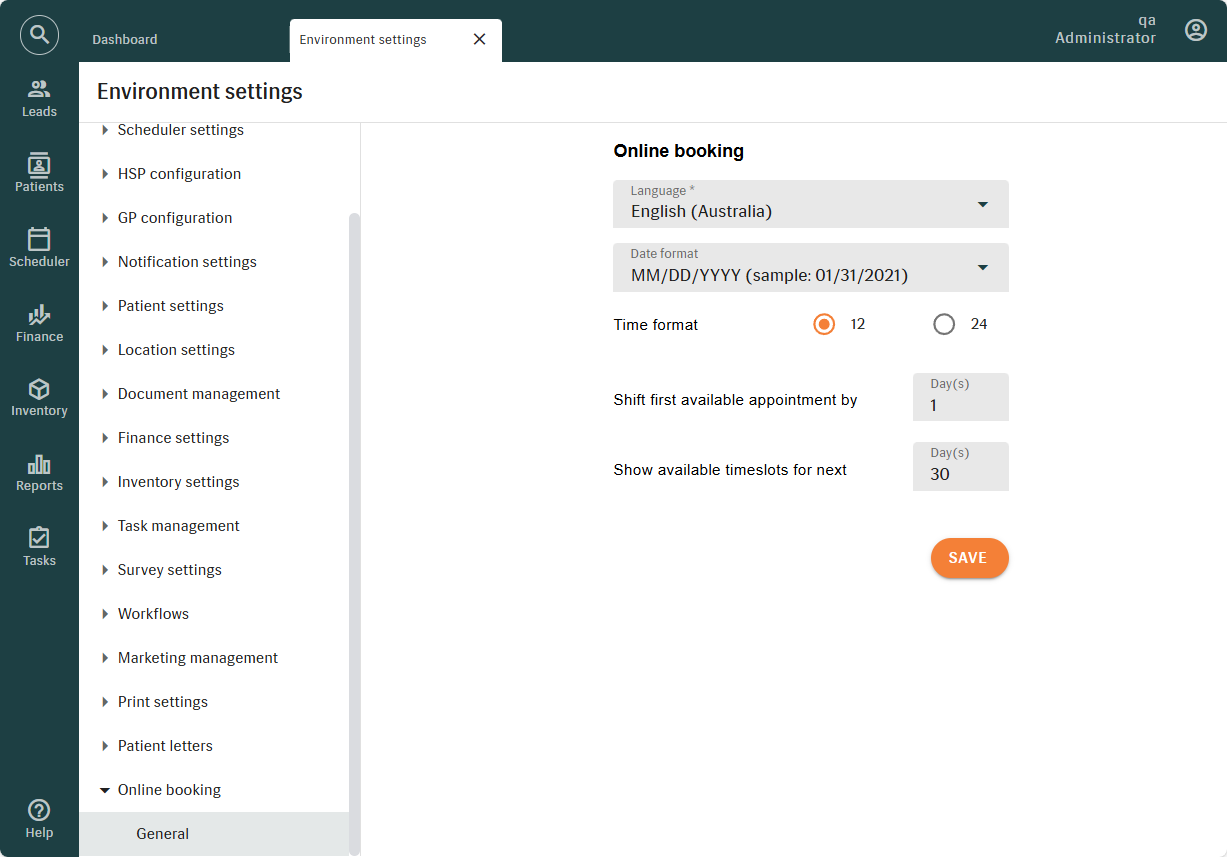
On the GENERAL TAB, you can:
- Define a default language that will be used if a patient’s browser language is not supported.The default language acts as a backup. If the system cannot match the patient’s browser language to one of your supported languages, Online Booking will load in the language you have selected. This setting does not change the patient’s browser language; it only determines which language Online Booking displays.
- Set the date and time format to match regional or organizational preferences.
- Define how soon patients can book appointments using the "Shift First Available Appointment" setting:
- Leave the field empty to allow same-day bookings.
- Enter a numeric value (e.g., 1 or 2) to delay availability by that number of days.
- Specify how many days of available time slots the Online Booking Module should display using the "Show Available Timeslots" setting.
Changes apply only after clicking SAVE.
Related Articles
Appointment Scheduler
Welcome to the online training module on the scheduling features of Auditdata Manage! In this module, you'll learn to adeptly manage the appointment scheduling needs of your hearing care practice using Manage's sophisticated capabilities, including: ...Listo/Engage leads not showing in Manage
Listo/Engage leads not showing in Manage If leads created in Listo/Engage appear in your Auditdata Cloud reports but do not show under Manage → Lead, this is usually because too many fields are set as mandatory for patient leads in Manage. For ...Public Release Notes - Manage 11.8.0
About this release December 2, 2025, Manage 11.8.0 Manage 11.8.0 introduces powerful new capabilities to enhance operational flexibility, improve patient engagement, and deliver more accurate reporting — all designed to reduce manual effort and ...Public Release Notes - Manage 11.9.0
About this release January 5, 2026, Manage 11.9.0 Manage 11.9.0 introduces updates across Environment settings, Reporting, Patient management, and Public API. This release focuses on improving patient clarity during Online Booking, enhancing ...Public Release Notes - Manage 11.11.0
About this release March 3, 2026, Manage 11.11.0 Manage 11.11.0 introduces enhanced localization, smarter finance workflows, improved documentation automation, stronger scheduling controls, and expanded API capabilities, along with usability ...